
Here are the full release notes for the April release of DEEPCRAFT™ Studio:
You can now stream data from PSOC™ Edge E84 Artificial Intelligence Kit and PSOC™ Edge E84 Evaluation Kit to DEEPCRAFT™ Studio over Wi‑Fi network, in addition to serial connection. As long as the kit and DEEPCRAFT™ Studio are on the same Wi‑Fi network, you can collect data from different locations. You can stream data using the different sensors present on the kit.
Before streaming data over Wi‑Fi, flash the kit with the hex file hosted on 2026‑05‑12. The hex file includes firmware for both Wi‑Fi and serial data streaming. If you flashed the board before 2026‑05‑12, you can only stream data over serial connection. Re-flash the board to enable Wi‑Fi data streaming functionality. Refer to Streaming Firmware for PSOC™ Edge E84 AI Kit and Streaming Firmware for PSOC™ Edge E84 Evaluation Kit to know how to flash the hex file onto the kit. After flashing the kit, enable Wi‑Fi on the board to start streaming. For step‑by‑step instructions, see How to stream data into Studio over Wi-Fi network for PSOC™ Edge E84 AI Kit and How to stream data into Studio over Wi-Fi network for PSOC™ Edge E84 Evaluation Kit respectively.
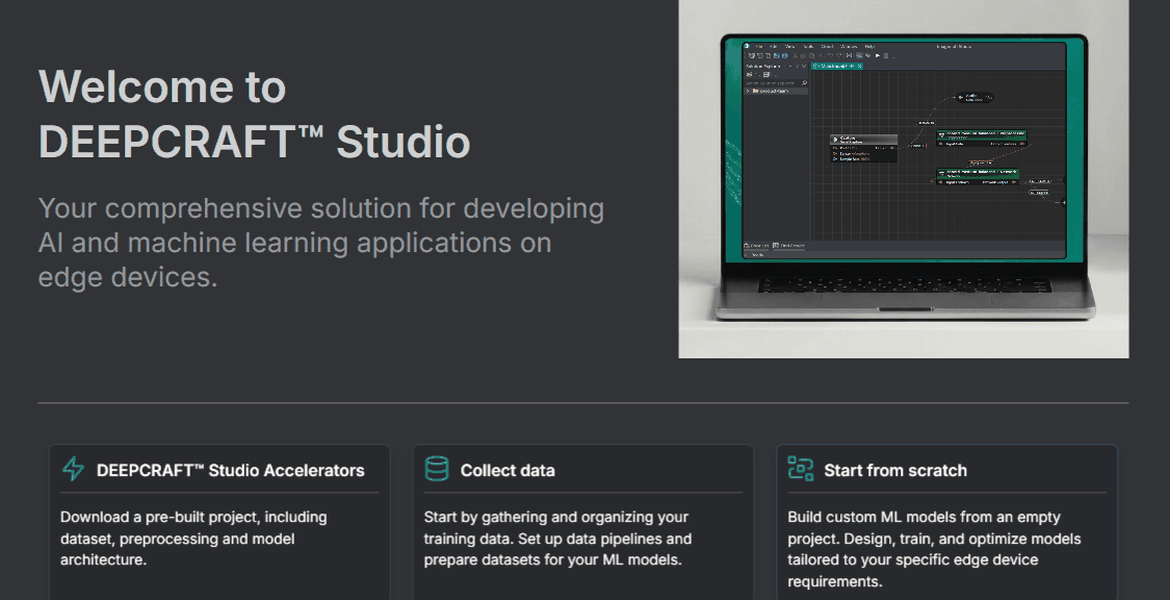
We have created an intuitive Welcome page in DEEPCRAFT™ Studio to help you get started quickly and smoothly. Use the cards to download studio accelerators projects, collect real-time data using Graph UX, or create an empty project to build your own custom models from scratch.
Overall bug fixes and increased stability
Don't forget to restart DEEPCRAFT™ Studio to see the latest updates.