
Date 07/02/26

July 2026 Studio Release

Here are the full release notes for the July release of DEEPCRAFT™ Studio


Local Model Training

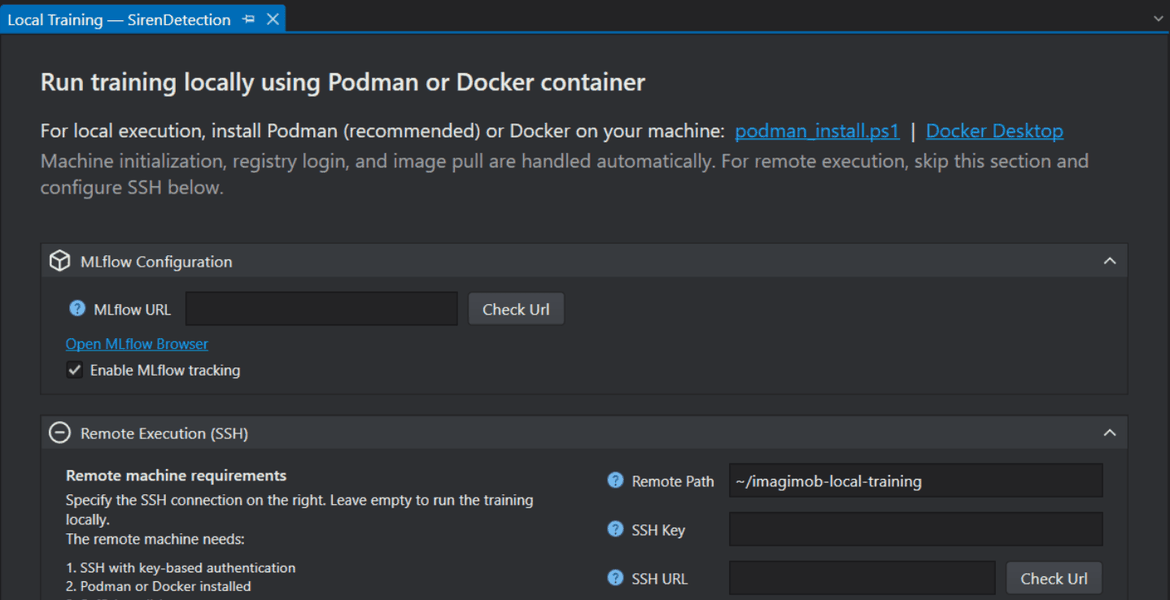
Local Model Training feature allows you to train models locally on your own PC or on a Linux-based server within your network. The server may be an on-premises machine, a virtual machine, or a cloud instance accessible via SSH. Local training supports containerized environments using Podman or Docker, allowing you to train models consistently across supported systems. To know more, refer to Local Model Training.


Added the support for new C-API - Callback API

Added support for the Callback C API when generating code for models using Graph UX. This event-driven API lets applications register output callback functions during IMAI_init() and provide input data through the generated IMAI_enqueue{N}() functions. Model outputs are delivered automatically through the registered callbacks when available, without using IMAI_dequeue().

This means you can now generate code for more complex model graphs, including graphs with multiple inputs, multiple outputs, multiple sensors, or multiple model pipelines in the same graph using Code Gen Entry and Code Gen Exit nodes. DEEPCRAFT™ Studio automatically selects the API style based on your model’s structure. When more than one API style is applicable in Graph UX, you can choose the preferred API style in the Generate Code template. This gives you the flexibility to select the API that best fits your application requirements. One such scenario is shown in the image below. For more information, see Edge API.


Generate Code in Graph UX Using Code Gen Entry and Code Gen Exit Nodes

With the introduction of the Callback C API, Graph UX now uses Code Gen Entry and Code Gen Exit nodes to define which part of the graph is included in code generation. This replaces the previous workflow, where you selected input and output nodes and generated code only for the graph section between the selected nodes.

In the new workflow, you can place Code Gen Entry and Code Gen Exit nodes at the desired nodes in the graph. You can also add multiple pairs of the nodes in the same graph, allowing you to generate code for different graph sections at the same time. This enables code generation for more complex use cases, such as graphs with multiple sensors, models with multiple outputs, and multiple model pipelines in a single graph.
Advanced users can also use this workflow for debugging and experimentation. For example, you can generate code for both the model and the preprocessor from the same graph. This is useful when preprocessing or post-processing needs to run on the board, or when behavior may differ between the PC and the target board because of memory constraints, sensor differences, or hardware-specific processing. You can also simulate different environments in Graph UX, generate code for both raw and augmented data paths, and deploy one of those paths to the board for validation.
For vision models, Graph UX automatically adds Code Gen Entry and Code Gen Exit nodes when you open a .tflite file for code generation for the first time. If you used the .tflite file for code generation before this change, you must add these nodes manually. Add the Code Gen Entry node before the cast node and the Code Gen Exit node before the bounding box track node by right-clicking the connection between nodes and inserting the required code generation nodes. To know more, refer to Code Generation for Vision Models.


Added Ethos-U55 NPU optimization options for PSOC™ Edge M55+U55

Two new optimization options are now available for PSOC™ Edge M55+U55 in the Code Generation tab: Arena Cache Strategy and Force Python Backend.

Arena Cache Strategy allows you to choose how the arena cache size is determined for Ethos-U55 NPU memory optimization. You can select Min, Max, or Custom. Max is the default option, while Custom enables the Arena Cache Size field, allowing you to specify the cache size manually in bytes.

Force Python Backend enables the deprecated Vela Python API backend for model optimization when required. When enabled, additional Python-backend-specific settings become available, including Recursion Limit for large model graph traversal and Max Block Dependency for controlling dependency delays between NPU kernel operations.

Refer to Advanced optimization for PSOC™ Edge M55+U55 for more details.


Improvements

  • Improved the Data pane filter experience by displaying a clear message when no sessions match the active filters. To know how to apply filters on columns, refer Data Tab.
  • Improved Solution Explorer persistence by restoring the previous tree expansion.
  • Improved file handling by restoring the previous selection state and offering a dismissible confirmation dialog to reopen files from the previous Studio session.
  • Improved stability when connecting to boards over Wi-Fi for data collection, and added a new icon to indicate whether the board is connected via serial or Wi-Fi.
  • Improved the responsiveness of DEEPCRAFT™ Studio, especially when opening (.improj) project files.
  • Unit Contracts can now raise non-blocking warnings: Added support for non-blocking Warn contracts in imunit, allowing units to flag questionable usage without failing compilation.


Fixes

  • Overall bug fixes and increased stability


LATEST ARTICLES
arrow_forward
Date 07/02/26

July 2026 Studio Release

Here are the full release notes for the July release of DEEP...

Date 06/02/26

June 2026 Studio Release Notes

New NV12 to Image unitWe have included a new unit NV12 to Im...

Date 05/20/26

Unlock the Power of Computer Vision: Counting and ...

Date 04/22/26

April 2026 DEEPCRAFT™ Studio Release

Date 10/20/25

October 2025 Studio Release

Date 06/25/25

Behind the Scenes: An Interview with the CEO and M...

Date 06/05/25

Generative AI on the Edge for DEEPCRAFT™ users—exp...

Date 05/23/25

Behind the Scenes: An Interview with the Product D...

Date 03/09/25

Starter Models are here! But what are they?

Date 03/03/25

Generative AI on the Edge: What Does the Future Ho...

Date 02/17/25

February 2025 Studio Release

Date 01/14/25

4 Ways to Leverage Generative AI on the Edge

Date 11/26/24

Delivering world class edge AI - watch the video

Date 11/05/24

November release of DEEPCRAFT™ Studio

Date 09/13/24

New research on data quality's role in model effic...

Date 09/03/24

September Release of Imagimob Studio

Date 07/05/24

Imagimob at tinyML Innovation Forum 2024

Date 07/01/24

Imagimob Studio 5.0 has arrived!

Date 05/13/24

May release of Imagimob Studio

Date 04/11/24

2024 State of Edge AI Report

Date 03/11/24

What is Edge AI?

Date 03/08/24

March release of Imagimob Studio

Date 02/18/24

What is tinyML?

Date 02/06/24

February release of Imagimob Studio

Date 01/16/24

Introducing Graph UX: A new way to visualize your ...

Date 12/06/23

Imagimob Ready Models are here. Time to accelerate...

Date 01/27/23

Deploying Quality SED models in a week

Date 11/17/22

An introduction to Sound Event Detection (SED)

Date 11/14/22

Imagimob condition monitoring AI-demo on Texas Ins...

Date 11/01/22

Alert Vest – connected tinyML safety vest by Swanh...

Date 10/21/22

Video recording from tinyML AutoML Deep Dive

Date 10/19/22

Edge ML Project time-estimates

Date 10/05/22

An introduction to Fall detection - The art of mea...

Date 04/20/22

Imagimob to exhibit at Embedded World 2022

Date 03/12/22

The past, present and future of Edge AI

Date 03/10/22

Recorded AI Tech Talk by Imagimob and Arm on April...

Date 03/05/22

The Future is Touchless: Radical Gesture Control P...

Date 01/07/22

How to build an embedded AI application

Date 12/07/21

Don’t build your embedded AI pipeline from scratch...

Date 12/02/21

Imagimob @ CES 2022

Date 11/25/21

Imagimob AI in Agritech

Date 10/19/21

Deploying Edge AI Models - Acconeer example

Date 10/11/21

Imagimob AI used for condition monitoring of elect...

Date 09/21/21

Tips and Tricks for Better Edge AI models

Date 06/18/21

DEEPCRAFT™ Studio (formerly Imagimob Studio) integ...

Date 05/10/21

Recorded Webinar - Imagimob at Arm AI Tech Talks o...

Date 04/23/21

Gesture Visualization in Imagimob Studio

Date 04/01/21

New team members

Date 03/15/21

Imagimob featured in Dagens Industri

Date 02/22/21

Customer Case Study: Increasing car safety through...

Date 12/18/20

Veoneer, Imagimob and Pionate in joint research pr...

Date 11/20/20

Edge computing needs Edge AI

Date 11/12/20

Imagimob video from tinyML Talks

Date 10/28/20

Agritech: Monitoring cattle with IoT and Edge AI

Date 10/19/20

Arm Community Blog: Imagimob - The fastest way fro...

Date 09/21/20

Imagimob video from Redeye AI seminar

Date 05/07/20

Webinar - Gesture control using radar and Edge AI

Date 04/08/20

tinyML article with Nordic Semiconductors

Date 12/11/19

Edge AI for techies, updated December 11, 2019

Date 12/05/19

Article in Dagens Industri: This is how Stockholm-...

Date 09/06/19

The New Path to Better Edge AI Applications

Date 07/01/19

Edge Computing in Modern Agriculture

Date 04/07/19

Our Top 3 Highlights from Hannover Messe 2019

Date 03/26/19

The Way You Collect Data Can Make or Break Your Ne...

Date 03/23/18

AI Research and AI Safety

Date 01/30/18

Imagimob and Autoliv demo at CES 2018

Date 05/24/17

Wearing Intelligence On Your Sleeve

LOAD MORE keyboard_arrow_down