
Date 10/30/26

October 2026 Studio release

New Features and Enhancements


Dataset Node in Graph UX

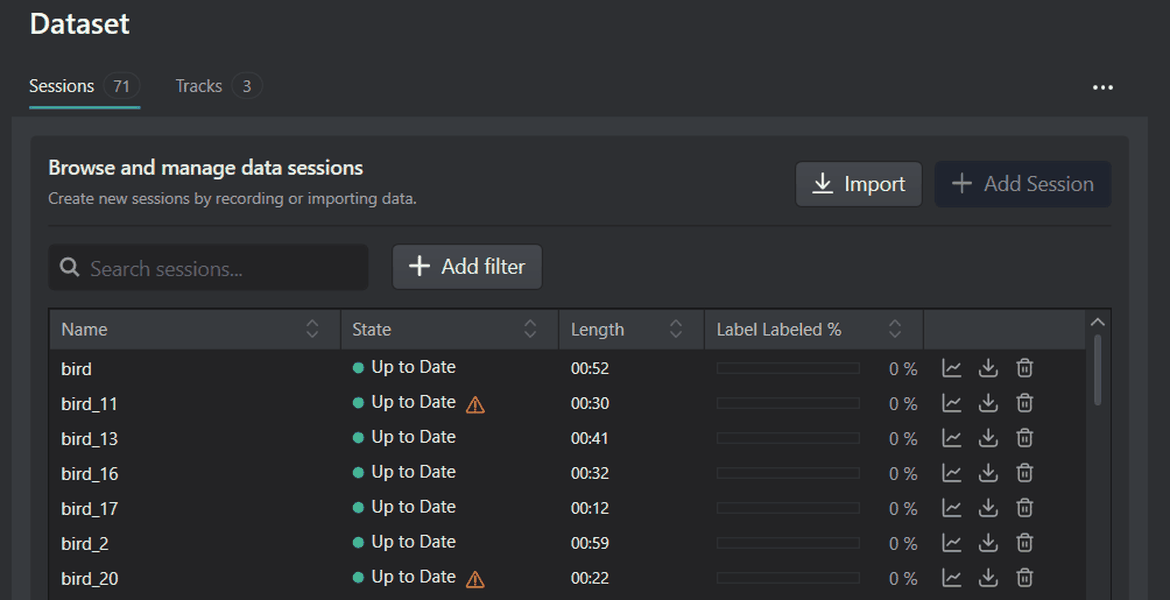
We have introduced the Dataset node in Graph UX, a step toward a complete edge machine learning workflow in Graph UX. The Dataset node is a self-contained place to collect, import, label, and manage your data inside the graph, so your data is no longer scattered across folders and files.

Currently, collecting data means connecting a sensor node to a Tracks node, defining classes in a Predefined node, saving the sessions, and manually adding the data to a project. The Dataset node brings this whole process into a single node:

  • Connect a sensor node to the Dataset node, and the data tracks are created automatically.
  • Create label tracks, define classes, and label your data directly in the node.
  • Import existing data into the same Dataset node.
  • Send the data straight to a training project in DEEPCRAFT™ Studio when the data is ready.

The Dataset node also lays the groundwork for batch data processing. By connecting two Dataset nodes with processing nodes in between, you can clean or augment an entire dataset in one operation.

The Dataset node also comes with a rebuilt timeline that handles large volumes of data more efficiently. Because the timeline no longer renders every data point, zooming, scrolling, and navigating are smoother. You can also record data from high-bandwidth sensors, such as radar, without slowdowns or crashes. The improved timeline is available only in the Dataset node.

To know more, refer to Introduction to Dataset Node.

Train your object detection models using YOLO11n and YOLO26n architectures

You can now train object detection models on custom data in DEEPCRAFT™ Studio using the Ultralytics YOLO11n and YOLO26n architectures. YOLO11n balances accuracy, speed and efficiency. YOLO26n uses a lighter detection head and updated training methods that improve accuracy, especially on small objects. Its streamlined design also makes it well suited to efficient deployment. For step-by-step instructions on training an object detection model, refer to Training Object Detection Model.

Interpreterless mode available in in code generation

DEEPCRAFT™ Studio now offers Interpreterless mode that pre-interprets the model to generate the static C++ code that executes the neural network directly, removing the need for the TensorFlow Lite Micro interpreter at runtime. When this option is enabled, the runtime, memory planner and unused operator code, memory planner are not compiled into the final application, reducing the ROM footprint. This can provide memory savings for very small models (under 400 KB) that use a limited set of operator types. Refer to Optimization to know how to use the Interpreterless mode. This option is supported only on the PSOC 6 and PSOC Edge M33/NNLite targets.

Support for Int8x8 and Int16x8 quantization in code generation

You can now quantize models to Int8x8 or Int16x8 during code generation by providing representative input samples for calibration. Int8x8 minimizes inference time, memory, and bandwidth use, while Int16x8 offers higher accuracy for models that benefit from larger activation data types, with a small increase in memory usage and inference time. To know more, refer to Optimization.


Improvements


Local Model Training

Local Model Training now includes two new options in the training configuration: Use GPU for training and Imagifier Image. You can train models on an NVIDIA GPU as well as on the CPU, which speeds up training for larger models. When you enable this option, training runs on the GPU using the CUDA-based container image. When you disable this option, training runs on the CPU using the CPU-based container image. You can now use a custom container image for training instead of the default image for your project type. By default, this option uses the standard image for your project type. To know more, refer to Local Model Training.


Labeling in Object Detection

You can now filter and sort the Image list to find the images you need faster. Click the Filter images button to filter by label, including Unlabeled, or by set (train, validation or test). Each active filter appears as a chip next to the search box, so you can see and remove filters at a glance. You can also sort the list by Name, Label Count or Set. Sorting by Label Count in ascending order lists unlabeled images first. When you filter or sort the list, the Next and Previous controls continue from the current image.

Reorganized Buttons in the Data and Training Tab

We have reorganized the Data and Training tabs to make common actions easier to find. The most-used actions now appear as buttons and related actions are grouped into dropdown menus.

  • Data tab: The Prepare Data dropdown contains Edit Tracks, Merge Data, Augment Data and Generate Labels.
  • Training tab: The Start Training dropdown let you select between Local or Cloud training. The Model Generation dropdown contains Generate Models, Create Custom Model and Import Architecture.


Fixes

Overall bug fixes and increased stability


Don't forget to restart DEEPCRAFT™ Studio to see the latest updates.

LATEST ARTICLES
arrow_forward
Date 10/30/26

October 2026 Studio release

New Features and EnhancementsDataset Node in Graph UXWe have...

Date 10/01/26

Behind the Scenes: An Interview with the CTO/CPO o...

Meet our CTO Magnus Gedda! We recently sat down with Im...

Date 08/18/26

What are DEEPCRAFT™ Studio Accelerators?

Date 08/13/26

The Future of Autonomous Systems: Unlocking th...

Date 07/02/26

July 2026 Studio Release

Date 06/02/26

June 2026 Studio Release Notes

Date 05/20/26

Unlock the Power of Computer Vision: Counting and ...

Date 04/22/26

April 2026 DEEPCRAFT™ Studio Release

Date 03/20/26

Generative AI on the Edge for DEEPCRAFT™ users—exp...

Date 02/04/26

Generative AI on the Edge: What Does the Future Ho...

Date 01/14/26

4 Ways to Leverage Generative AI on the Edge

Date 10/20/25

October 2025 Studio Release

Date 06/25/25

Behind the Scenes: An Interview with the CEO and M...

Date 05/23/25

Behind the Scenes: An Interview with the Product D...

Date 03/09/25

DEEPCRAFT™ Studio Accelerators are here! But what ...

Date 02/26/25

Infineon’s Edge AI platform DEEPCRAFT™ Studio intr...

Date 02/17/25

February 2025 Studio Release

Date 02/09/25

Imagimob launches DEEPCRAFT™ Studio Accelerators; ...

Date 11/26/24

Delivering world class edge AI - watch the video

Date 11/05/24

November release of DEEPCRAFT™ Studio

Date 10/30/24

Infineon introduces DEEPCRAFT™ brand for Edge AI s...

Date 10/08/24

Imagimob's Edge AI solutions are now available for...

Date 09/13/24

New research on data quality's role in model effic...

Date 09/03/24

September Release of Imagimob Studio

Date 07/05/24

Imagimob at tinyML Innovation Forum 2024

Date 07/01/24

Imagimob Studio 5.0 has arrived!

Date 05/13/24

May release of Imagimob Studio

Date 04/11/24

2024 State of Edge AI Report

Date 03/11/24

What is Edge AI?

Date 03/08/24

March release of Imagimob Studio

Date 02/18/24

What is tinyML?

Date 02/06/24

February release of Imagimob Studio

Date 01/16/24

Imagimob’s visual Graph UX revolutionizes Machine ...

Date 01/16/24

Introducing Graph UX: A new way to visualize your ...

Date 12/06/23

Imagimob Ready Models are here. Time to accelerate...

Date 05/23/23

Infineon acquires Tiny Machine Learning leader Ima...

Date 01/27/23

Deploying Quality SED models in a week

Date 11/17/22

An introduction to Sound Event Detection (SED)

Date 11/14/22

Imagimob condition monitoring AI-demo on Texas Ins...

Date 11/01/22

Alert Vest – connected tinyML safety vest by Swanh...

Date 10/21/22

Video recording from tinyML AutoML Deep Dive

Date 10/19/22

Edge ML Project time-estimates

Date 10/05/22

An introduction to Fall detection - The art of mea...

Date 04/20/22

Imagimob to exhibit at Embedded World 2022

Date 03/12/22

The past, present and future of Edge AI

Date 03/10/22

Recorded AI Tech Talk by Imagimob and Arm on April...

Date 03/05/22

The Future is Touchless: Radical Gesture Control P...

Date 01/07/22

How to build an embedded AI application

Date 12/07/21

Don’t build your embedded AI pipeline from scratch...

Date 12/02/21

Imagimob @ CES 2022

Date 11/25/21

Imagimob AI in Agritech

Date 10/19/21

Deploying Edge AI Models - Acconeer example

Date 10/11/21

Imagimob AI used for condition monitoring of elect...

Date 09/21/21

Tips and Tricks for Better Edge AI models

Date 06/18/21

DEEPCRAFT™ Studio (formerly Imagimob Studio) integ...

Date 05/10/21

Recorded Webinar - Imagimob at Arm AI Tech Talks o...

Date 04/23/21

Gesture Visualization in Imagimob Studio

Date 04/01/21

New team members

Date 03/15/21

Imagimob featured in Dagens Industri

Date 02/22/21

Customer Case Study: Increasing car safety through...

Date 12/18/20

Veoneer, Imagimob and Pionate in joint research pr...

Date 11/20/20

Edge computing needs Edge AI

Date 11/12/20

Imagimob video from tinyML Talks

Date 10/28/20

Agritech: Monitoring cattle with IoT and Edge AI

Date 10/19/20

Arm Community Blog: Imagimob - The fastest way fro...

Date 09/21/20

Imagimob video from Redeye AI seminar

Date 05/07/20

Webinar - Gesture control using radar and Edge AI

Date 04/08/20

tinyML article with Nordic Semiconductors

Date 12/11/19

Edge AI for techies, updated December 11, 2019

Date 12/05/19

Article in Dagens Industri: This is how Stockholm-...

Date 09/06/19

The New Path to Better Edge AI Applications

Date 07/01/19

Edge Computing in Modern Agriculture

Date 04/07/19

Our Top 3 Highlights from Hannover Messe 2019

Date 03/26/19

The Way You Collect Data Can Make or Break Your Ne...

Date 03/23/18

AI Research and AI Safety

Date 01/30/18

Imagimob and Autoliv demo at CES 2018

Date 05/24/17

Wearing Intelligence On Your Sleeve

LOAD MORE keyboard_arrow_down