
Date 11/19/26

Unlock the Power of Sensor Fusion: Combining Audio and Motion in DEEPCRAFT™ Studio

DEEPCRAFT™ Studio now supports sensor fusion. You can combine signals from several sensors into a single model input, directly in our Graph UX interface. In this blog post, ML Engineer Gustav Nilsson looks at what sensor fusion is and why it matters. He also shows how to combine audio and motion data in your own Edge AI projects.

One Sensor, One Perspective
Every sensor sees the world from one angle. A microphone hears what a machine sounds like. An IMU (inertial measurement unit) feels how it moves and vibrates. Each gives you useful information, but each has blind spots. A microphone next to a motor also picks up background noise, nearby machines and people talking, so a fault can be buried in sound that has nothing to do with it. An IMU feels vibration very precisely, but some faults show up in the sound long before they show up in the movement.
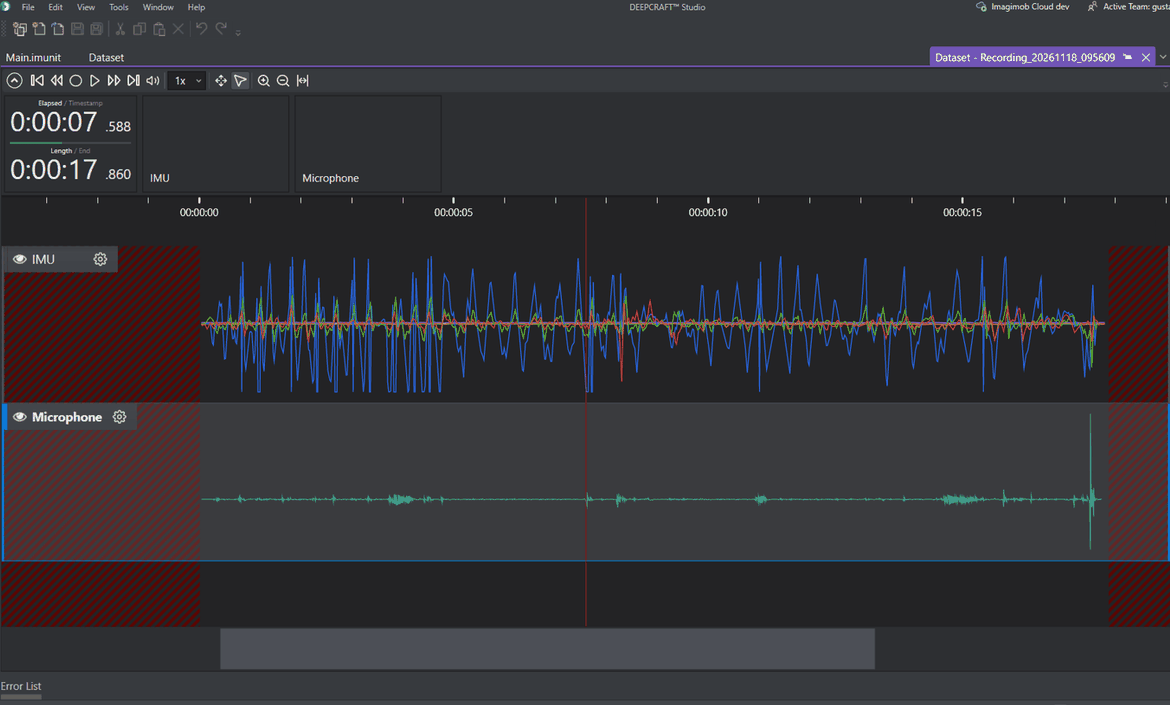
An IMU and a microphone recording at the same time, shown as two separate tracks on the DEEPCRAFT™ Studio timeline. The IMU captures movement on several axes, while the microphone captures sound.


Sensor Fusion: Seeing the Whole Picture

Sensor fusion combines signals from several sensors into one view of what is happening. When the model gets both the sound and the vibration of the motor at the same time, it can learn patterns that neither sensor shows on its own. For example, a specific sound might only mean a fault when it comes with a certain vibration. This makes the model more robust against noise and more accurate on the cases that matter.

The difficulty is that sensors don't run at the same pace. A microphone captures thousands of samples per second, while an IMU typically captures around a hundred. To feed both into one model, the signals must be aligned in time and merged into a single stream.
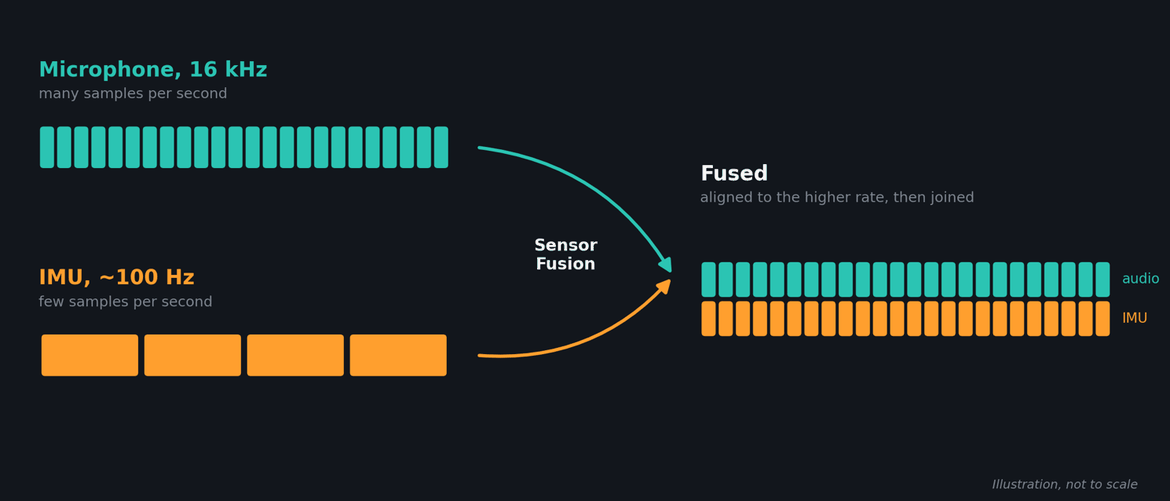
The microphone delivers many samples per second, the IMU only a few. Sensor fusion aligns both to the higher rate and joins them into one stream.


The Sensor Fusion Node: Combining Signals in One Step

The new Sensor Fusion node in DEEPCRAFT™ Studio handles this for you. You'll find it in the node library under Signal Processing → Time Domain.

It takes two input signals, resamples both to the higher of the two rates, and joins them into one combined signal that your model can train on.
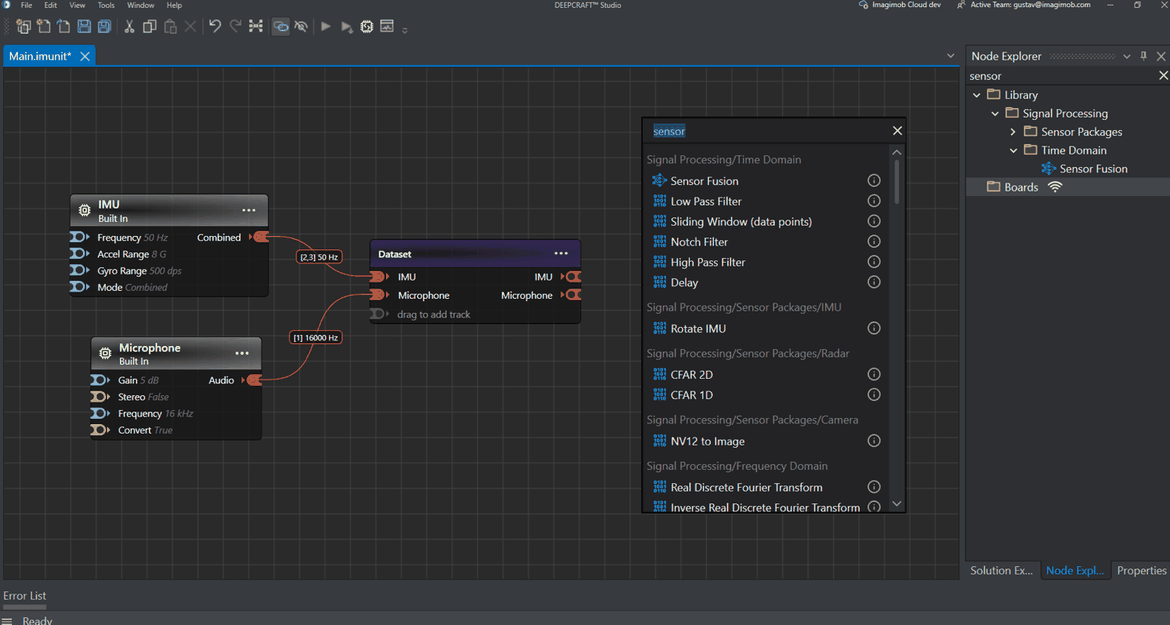
Where to find the node: search for “sensor” in the graph, or open Signal Processing/Time Domain in the Node Explorer. In this graph, a built-in IMU (50 Hz) and microphone (16 kHz) record into a Dataset.
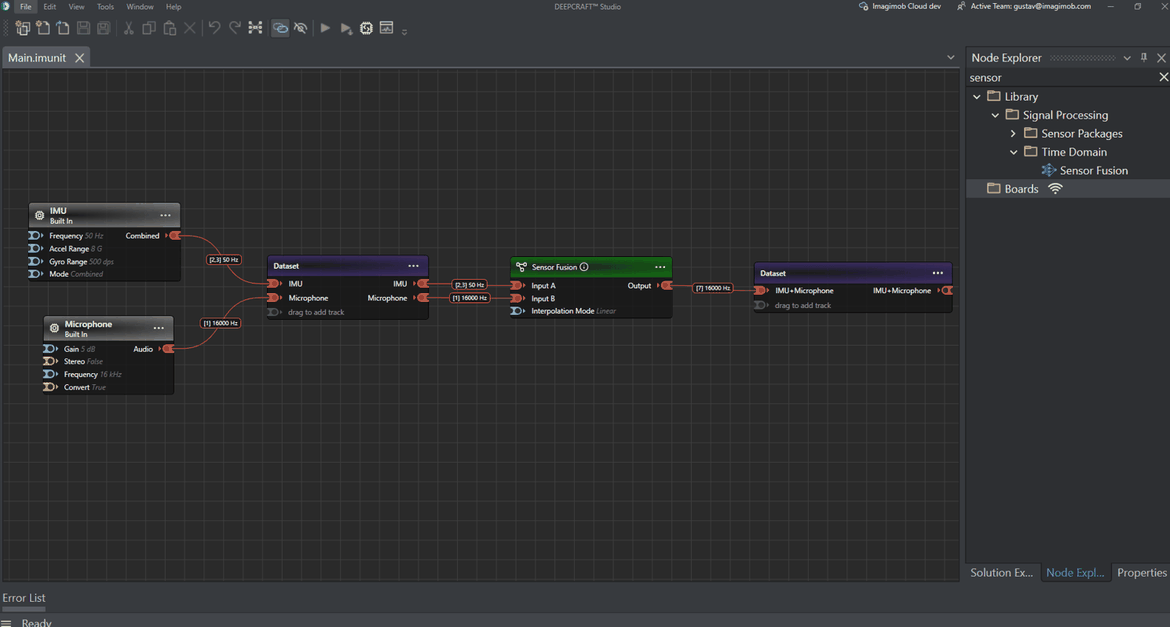

The Sensor Fusion node wired up: the IMU goes to Input A and the microphone to Input B. The output runs at the microphone’s 16 kHz and holds seven values per sample; six from the IMU and one from the microphone.


There is one practical point when fusing audio with motion data. Because the node resamples to the higher rate, fusing raw audio directly with an IMU would stretch the slow IMU signal to the audio rate, about 160 times more samples. A better approach is to first turn the audio into features, such as a mel spectrogram, at a frame rate close to the IMU's. The fused signal then stays compact, and each part of it carries meaningful information.

A Showcase Project: Built Entirely in Graph UX

Our condition monitoring showcase project is built entirely in the Graph UX interface. A microphone and an IMU record a running motor. The audio is turned into features, fused with the IMU signal, and fed into a classification model. You can record, view, fuse and train in one workflow, without writing any code. The project can be built and trained in DEEPCRAFT™ Studio today. Deploying fused models to hardware is coming soon.
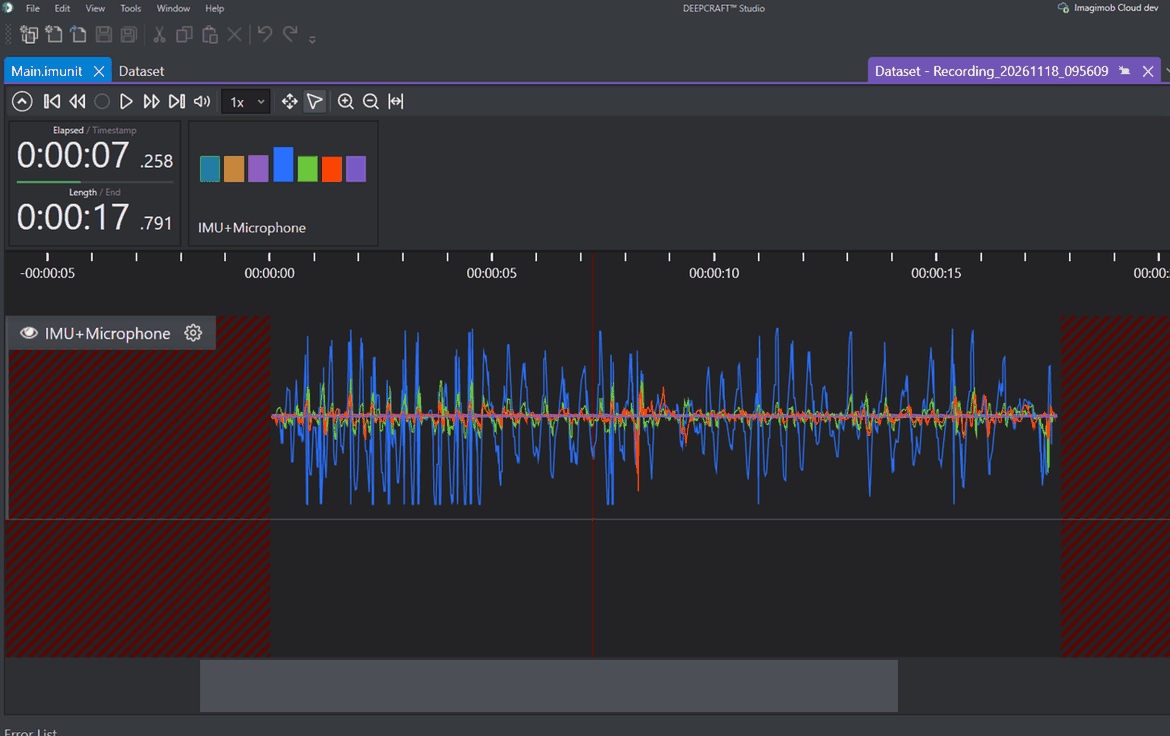
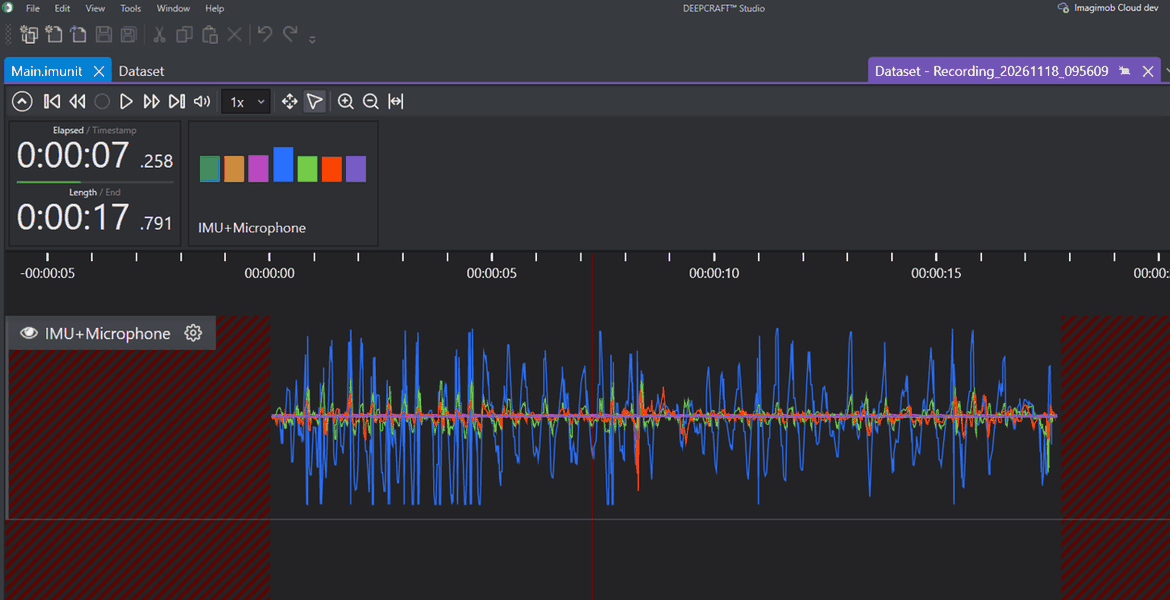
The showcase recording after fusion: one IMU+Microphone track in the Dataset, holding both sensors’ signals in a single lane, ready for training.


More News: Smoother Multi-Sensor Recording

Working with several sensors means more than fusing their signals. We've also improved the experience around it:

  • Record several sensors at once. The radar now keeps streaming when other sensors on the same board start recording.
  • Radar heatmaps. The Heatmap chart can now show the radar Gesture preset.
  • Smoother live timelines. Live line lanes no longer break up during recording, and live lanes stay in time with the recording instead of drifting slightly behind.
  • More flexible imports. Sessions with sensor sample rates that differ by up to ±20% can now be imported together into the same Dataset.
  • Fused audio on the timeline. Fused tracks that contain audio are drawn as sensor signals rather than as audio for playback.

Get Started with Sensor Fusion in DEEPCRAFT™ Studio

With sensor fusion in DEEPCRAFT™ Studio, your models no longer have to rely on a single sensor. Whether you're monitoring machines, recognizing activities or detecting events that only show up across several signals, DEEPCRAFT™ Studio gives you the tools to combine your data and build more robust Edge AI models. Stay tuned for more updates and tutorials on how to use these features in your own projects.


Don't miss out on the latest blogs, news and more from Imagimob! 

Subscribe to our monthly newsletter to stay up-to-date on all the latest blogs, news, events, webinars and more from Imagimob.

LATEST ARTICLES
arrow_forward
Date 11/19/26

Unlock the Power of Sensor Fusion: Combining Audio...

Date 10/30/26

October 2026 Studio release

New Features and EnhancementsDataset Node in Graph UXWe have...

Date 10/01/26

Behind the Scenes: An Interview with the CTO/CPO o...

Date 08/18/26

What are DEEPCRAFT™ Studio Accelerators?

Date 08/13/26

The Future of Autonomous Systems: Unlocking th...

Date 07/02/26

July 2026 Studio Release

Date 06/02/26

June 2026 Studio Release Notes

Date 05/20/26

Unlock the Power of Computer Vision: Counting and ...

Date 04/22/26

April 2026 DEEPCRAFT™ Studio Release

Date 03/20/26

Generative AI on the Edge for DEEPCRAFT™ users—exp...

Date 02/04/26

Generative AI on the Edge: What Does the Future Ho...

Date 01/14/26

4 Ways to Leverage Generative AI on the Edge

Date 10/20/25

October 2025 Studio Release

Date 06/25/25

Behind the Scenes: An Interview with the CEO and M...

Date 05/23/25

Behind the Scenes: An Interview with the Product D...

Date 03/09/25

DEEPCRAFT™ Studio Accelerators are here! But what ...

Date 02/26/25

Infineon’s Edge AI platform DEEPCRAFT™ Studio intr...

Date 02/17/25

February 2025 Studio Release

Date 02/09/25

Imagimob launches DEEPCRAFT™ Studio Accelerators; ...

Date 11/26/24

Delivering world class edge AI - watch the video

Date 11/05/24

November release of DEEPCRAFT™ Studio

Date 10/30/24

Infineon introduces DEEPCRAFT™ brand for Edge AI s...

Date 10/08/24

Imagimob's Edge AI solutions are now available for...

Date 09/13/24

New research on data quality's role in model effic...

Date 09/03/24

September Release of Imagimob Studio

Date 07/05/24

Imagimob at tinyML Innovation Forum 2024

Date 07/01/24

Imagimob Studio 5.0 has arrived!

Date 05/13/24

May release of Imagimob Studio

Date 04/11/24

2024 State of Edge AI Report

Date 03/11/24

What is Edge AI?

Date 03/08/24

March release of Imagimob Studio

Date 02/18/24

What is tinyML?

Date 02/06/24

February release of Imagimob Studio

Date 01/16/24

Imagimob’s visual Graph UX revolutionizes Machine ...

Date 01/16/24

Introducing Graph UX: A new way to visualize your ...

Date 12/06/23

Imagimob Ready Models are here. Time to accelerate...

Date 05/23/23

Infineon acquires Tiny Machine Learning leader Ima...

Date 01/27/23

Deploying Quality SED models in a week

Date 11/17/22

An introduction to Sound Event Detection (SED)

Date 11/14/22

Imagimob condition monitoring AI-demo on Texas Ins...

Date 11/01/22

Alert Vest – connected tinyML safety vest by Swanh...

Date 10/21/22

Video recording from tinyML AutoML Deep Dive

Date 10/19/22

Edge ML Project time-estimates

Date 10/05/22

An introduction to Fall detection - The art of mea...

Date 04/20/22

Imagimob to exhibit at Embedded World 2022

Date 03/12/22

The past, present and future of Edge AI

Date 03/10/22

Recorded AI Tech Talk by Imagimob and Arm on April...

Date 03/05/22

The Future is Touchless: Radical Gesture Control P...

Date 01/07/22

How to build an embedded AI application

Date 12/07/21

Don’t build your embedded AI pipeline from scratch...

Date 12/02/21

Imagimob @ CES 2022

Date 11/25/21

Imagimob AI in Agritech

Date 10/19/21

Deploying Edge AI Models - Acconeer example

Date 10/11/21

Imagimob AI used for condition monitoring of elect...

Date 09/21/21

Tips and Tricks for Better Edge AI models

Date 06/18/21

DEEPCRAFT™ Studio (formerly Imagimob Studio) integ...

Date 05/10/21

Recorded Webinar - Imagimob at Arm AI Tech Talks o...

Date 04/23/21

Gesture Visualization in Imagimob Studio

Date 04/01/21

New team members

Date 03/15/21

Imagimob featured in Dagens Industri

Date 02/22/21

Customer Case Study: Increasing car safety through...

Date 12/18/20

Veoneer, Imagimob and Pionate in joint research pr...

Date 11/20/20

Edge computing needs Edge AI

Date 11/12/20

Imagimob video from tinyML Talks

Date 10/28/20

Agritech: Monitoring cattle with IoT and Edge AI

Date 10/19/20

Arm Community Blog: Imagimob - The fastest way fro...

Date 09/21/20

Imagimob video from Redeye AI seminar

Date 05/07/20

Webinar - Gesture control using radar and Edge AI

Date 04/08/20

tinyML article with Nordic Semiconductors

Date 12/11/19

Edge AI for techies, updated December 11, 2019

Date 12/05/19

Article in Dagens Industri: This is how Stockholm-...

Date 09/06/19

The New Path to Better Edge AI Applications

Date 07/01/19

Edge Computing in Modern Agriculture

Date 04/07/19

Our Top 3 Highlights from Hannover Messe 2019

Date 03/26/19

The Way You Collect Data Can Make or Break Your Ne...

Date 03/23/18

AI Research and AI Safety

Date 01/30/18

Imagimob and Autoliv demo at CES 2018

Date 05/24/17

Wearing Intelligence On Your Sleeve

LOAD MORE keyboard_arrow_down