
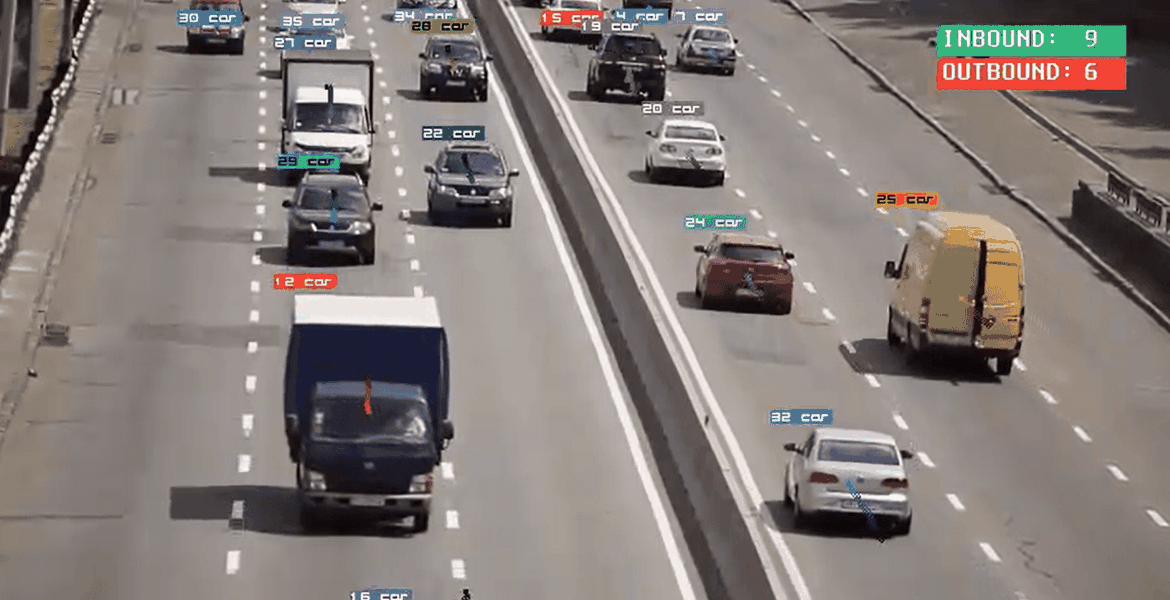
In October 2025, we proudly announced support for vision and object detection in DEEPCRAFT™ Studio, (read the announcement here) enabling developers to build robust object tracking and counting models directly within our intuitive Graph UX interface (read more about Graph UX and the benefits of a graph-based interface here). In this blog post, we're delving into the capabilities of object detection, tracking, and counting, and exploring how you can leverage these features in your own computer vision projects.
Object Detection: The Foundation of Computer Vision
Object detection is a fundamental computer vision technique that identifies, locates, and classifies multiple objects within an image. This technology has numerous applications, from surveillance and security to robotics and autonomous vehicles. However, object detection has one limitation: it cannot distinguish between individual instances of the same object across separate inferences. This means that every time the model looks at an image, it starts over. It can't remember or recognize that the object it sees now is the same as one it saw before.
To illustrate this concept, we've created a short video demonstration:
Object Tracking: Assigning Identity and Persistence
Object tracking takes object detection to the next level by resolving the identity of each detected object across inferences and assigning a persistent ID to each instance. You can see this in the following video where the model gives each object a unique ID, as well as a unique color to make it extra clear:
This ID then enables you to track an object's position in the image over time, creating a trail that visualizes its movement.
Our video example showcases this trail being visualized for each object.
Object Counting: Reliable Quantification
By tracking object instances over time, you can reliably count them. This is achieved by defining a zone in the image, where an object is counted when it crosses that zone. We've created a video to demonstrate this; the thick black line in the video below defines the zone.
The zone can then be hidden to produce the finished result, as shown in this video:
A Showcase Project: Built Entirely in Graph UX
Our project, built entirely in the Graph UX interface, demonstrates the breadth of what's possible within DEEPCRAFT™ Studio. The project includes image rendering, which can be deployed to a board with a display. While the project is not yet ready for deployment due to memory constraints, we're working towards making it deployable in the near future.
Get Started with Computer Vision in DEEPCRAFT™ Studio
With the introduction of vision and object detection support in DEEPCRAFT™ Studio, the possibilities for building innovative computer vision applications are endless. Whether you're looking to track objects, count instances, or detect anomalies, our platform provides the tools and flexibility you need to bring your ideas to life. Stay tuned for more updates and tutorials on how to leverage these features in your own projects.
Download DEEPCRAFT™ Studio here
Watch video tutorials on our YouTube here
Find all our tools and projects in the DEEPCRAFT™ AI Hub here